
Mortgage IQ1.2 - App Store
You'll be able to see results in few seconds.
Publisher Description
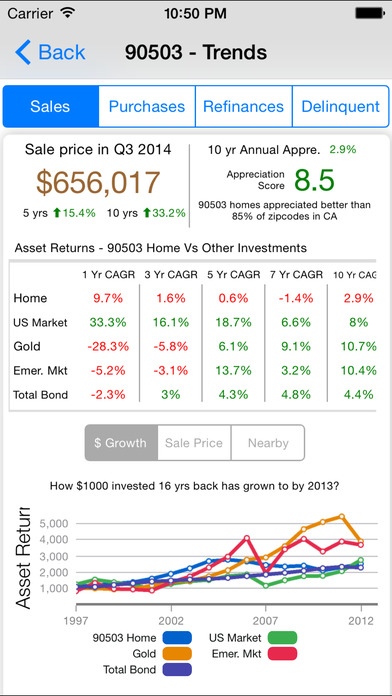
Provides the most sought after premium tools including Buy VS Rent, Zip codes by Home price Range, Home buyer ROI & Home vs Other assets to homebuyers!
1) Buy Vs Rent - Lets you visually customize your home data (Price, APR, Closing Costs, etc.) and recommends buying or renting a home by holding period. It automatically fills all the data relevant to your Postal code. It shows you ROI for both buying and renting scenarios, along with Annual Cashflow data.
2) Income Property Advisor - Based on Industry proven models, this premium tool provides you with a guidance on the profitability of your Income property including IRR, Detailed After tax Cashflow Streams for holding period, Sensitivity analysis.
3) Home Sale Trends - Shows you the Last 15 Years of home price appreciation trends. It also compares the $ made by appreciation in your zip code WITH other investments like US Stock market, GOLD, Bonds.
4) Visual Heat Map - It provides a great visualization of zip codes with in your specified range (city, 10-100 miles, state) for a home price range you are looking for, last 10 year CAGr that you would like to have, total 10 year returns you would like to see.
5) Purchase/Refi Trends - Based on comprehensive quarterly data, it shows the Average home prices, APR, Refi volumes for zip codes by FICO score range.
Requires iOS 8.0 or later. Compatible with iPhone, iPad, and iPod touch.
About Mortgage IQ
The company that develops Mortgage IQ is StatWhiz Ventures LLC. The latest version released by its developer is 1.2.
To install Mortgage IQ on your iOS device, just click the green Continue To App button above to start the installation process. The app is listed on our website since 2015-01-07 and was downloaded 0 times. We have already checked if the download link is safe, however for your own protection we recommend that you scan the downloaded app with your antivirus. Your antivirus may detect the Mortgage IQ as malware if the download link is broken.
How to install Mortgage IQ on your iOS device:
- Click on the Continue To App button on our website. This will redirect you to the App Store.
- Once the Mortgage IQ is shown in the iTunes listing of your iOS device, you can start its download and installation. Tap on the GET button to the right of the app to start downloading it.
- If you are not logged-in the iOS appstore app, you'll be prompted for your your Apple ID and/or password.
- After Mortgage IQ is downloaded, you'll see an INSTALL button to the right. Tap on it to start the actual installation of the iOS app.
- Once installation is finished you can tap on the OPEN button to start it. Its icon will also be added to your device home screen.
Program Details
System requirements
Download information
Pricing
Version History
version 1.2
posted on 2015-01-07
Disclaimer
Official App Store Link
We do not host Mortgage IQ on our servers. We did not scan it for viruses, adware, spyware or other type of malware. This app is hosted by Apple and passed their terms and conditions to be listed there. We recommend caution when installing it.
The App Store link for Mortgage IQ is provided to you by apps112.com without any warranties, representations or guarantees of any kind, so access it at your own risk.
If you have questions regarding this particular app contact the publisher directly. For questions about the functionalities of apps112.com contact us.
